SourceDrop

Multi-camera recording that writes straight to your drive.

A native macOS app that records multiple USB webcams simultaneously as clean, independent files written directly to an external drive.

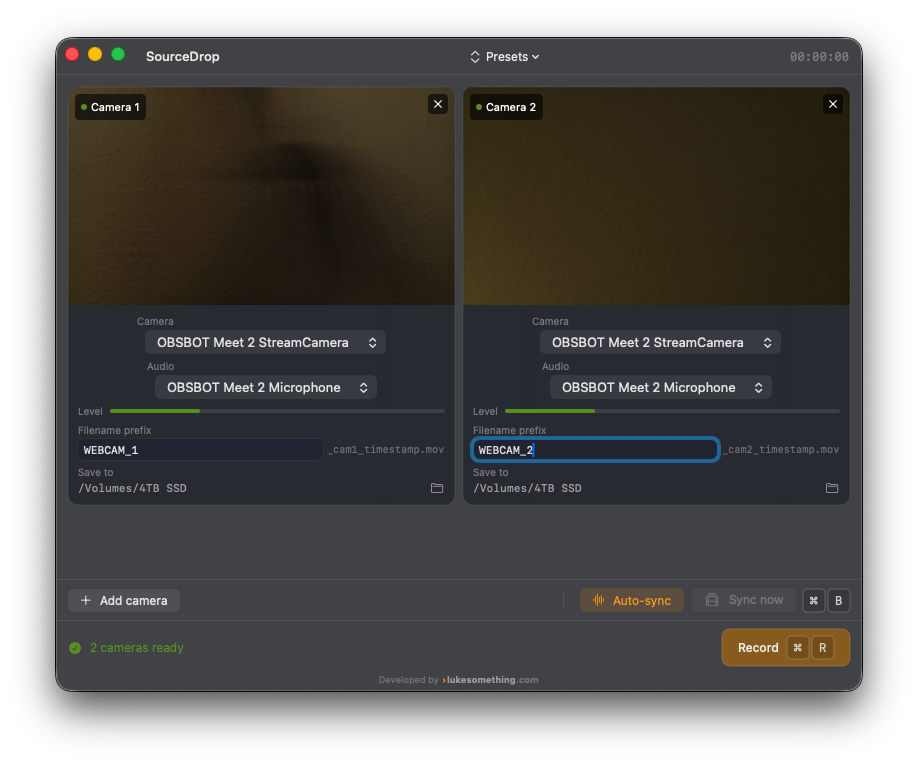
SourceDrop recording two OBSBOT webcams simultaneously, showing live camera previews, per-source audio levels, and independent filename and save-destination settings for each camera.

What it does

4 independent camera sources

Built for two OBSBOT Meet 2s, but expandable to four simultaneous USB camera sources.

Passthrough recording

Each camera’s native compressed stream writes straight to disk via AVFoundation — no re-encoding, no dropped frames, no encoder contention between sources.

Live previews & level meters

Every connected camera gets a live preview and a per-source audio level meter, so you can confirm every feed is good before you hit record.

Independent audio per camera

Choose an audio source per camera, embedded directly into that camera’s own file — no separate audio track to line up by hand.

Session presets

Save and recall full camera, audio, and destination-folder configurations for different recording setups.

Digital clapperboard sync

A sync tone fires automatically at the start of every recording, plus a manual “sync now” trigger mid-session, for frame-accurate multi-cam alignment in post.

How it works

1

Connect your cameras

Plug in up to four USB webcams; SourceDrop detects each source and shows a live preview.

2

Set your destination

Point recordings straight at an external drive — no internal-disk detour, no re-encoding.

3

Record in sync

Confirm every source with live previews and audio meters, then hit record — a clapperboard tone marks your sync point automatically.

4

Drop straight into your edit

Each camera lands as its own clean file, embedded audio and all, ready for DaVinci Resolve or your editor of choice.

Download

Download SourceDrop

Version 2.0 Current
Requires macOS 26.5 or later · Apple Silicon or Intel
Size 1.9 MB
Download v2.0

SourceDrop isn’t yet notarized through the Mac App Store. On first launch, if macOS blocks the app, go to System Settings → Privacy & Security and click “Open Anyway.”

Developed by lukesomething.com